Pipeline
This chapter covers all recommended aspects of Jenkins Pipeline functionality, including how to:
-
Get started with Pipeline, which covers how to define a Jenkins Pipeline (your
Pipeline) through the classic UI or in SCM. -
Create and use a
Jenkinsfile, which covers use-case scenarios on how to craft and construct yourJenkinsfile. -
Work with branches and pull requests.
-
Use Docker with Pipeline, covering how Jenkins can invoke Docker containers on agents/nodes (from a
Jenkinsfile) to build your Pipeline projects. -
Use different development tools to facilitate the creation of your Pipeline.
-
Work with Pipeline syntax, which provides a comprehensive reference of all Declarative Pipeline syntax.
For an overview of content in the Jenkins User Handbook, refer to the User Handbook Overview.
What is Jenkins Pipeline?
Jenkins Pipeline (or simply "Pipeline" with a capital "P") is a suite of plugins which supports implementing and integrating continuous delivery pipelines into Jenkins.
A continuous delivery (CD) pipeline is an automated expression of your process for getting software from version control right through to your users and customers. Every change to your software (committed in source control) goes through a complex process on its way to being released. This process involves building the software in a reliable and repeatable manner, as well as progressing the built software (called a "build") through multiple stages of testing and deployment.
Pipeline provides an extensible set of tools for modeling simple-to-complex delivery pipelines "as code" via the Pipeline domain-specific language (DSL) syntax. [1]
The definition of a Jenkins Pipeline is written into a text file (called a
Jenkinsfile) which in turn can be committed to a project’s
source control repository.
[2]
This is the foundation of "Pipeline-as-code"; treating the CD pipeline as a part of
the application to be versioned and reviewed like any other code.
Creating a Jenkinsfile and committing it to source control provides a number
of immediate benefits:
-
Automatically creates a Pipeline build process for all branches and pull requests.
-
Code review/iteration on the Pipeline (along with the remaining source code).
-
Audit trail for the Pipeline.
-
Single source of truth [3] for the Pipeline, which can be viewed and edited by multiple members of the project.
While the syntax for defining a Pipeline, either in the web UI or with a
Jenkinsfile is the same, it is generally considered best practice to define
the Pipeline in a Jenkinsfile and check that in to source control.
Declarative versus Scripted Pipeline syntax
A Jenkinsfile can be written using two types of syntax — Declarative and
Scripted.
Declarative and Scripted Pipelines are constructed fundamentally differently. Declarative Pipeline is designed to make writing and reading Pipeline code easier, and provides richer syntactical features over Scripted Pipeline syntax.
Many of the individual syntactical components (or "steps") written into a
Jenkinsfile, however, are common to both Declarative and Scripted Pipeline.
Read more about how these two types of syntax differ in Pipeline concepts
and Pipeline syntax overview below.
Why Pipeline?
Jenkins is, fundamentally, an automation engine which supports a number of automation patterns. Pipeline adds a powerful set of automation tools onto Jenkins, supporting use cases that span from simple continuous integration to comprehensive CD pipelines. By modeling a series of related tasks, users can take advantage of the many features of Pipeline:
-
Code: Pipelines are implemented in code and typically checked into source control, giving teams the ability to edit, review, and iterate upon their delivery pipeline.
-
Durable: Pipelines can survive both planned and unplanned restarts of the Jenkins controller.
-
Pausable: Pipelines can optionally stop and wait for human input or approval before continuing the Pipeline run.
-
Versatile: Pipelines support complex real-world CD requirements, including the ability to fork/join, loop, and perform work in parallel.
-
Extensible: The Pipeline plugin supports custom extensions to its DSL [1] and multiple options for integration with other plugins.
While Jenkins has always allowed rudimentary forms of chaining Freestyle Jobs together to perform sequential tasks, [4] Pipeline makes this concept a first-class citizen in Jenkins.
Building on the core Jenkins value of extensibility, Pipeline is also extensible both by users with Pipeline Shared Libraries and by plugin developers. [5]
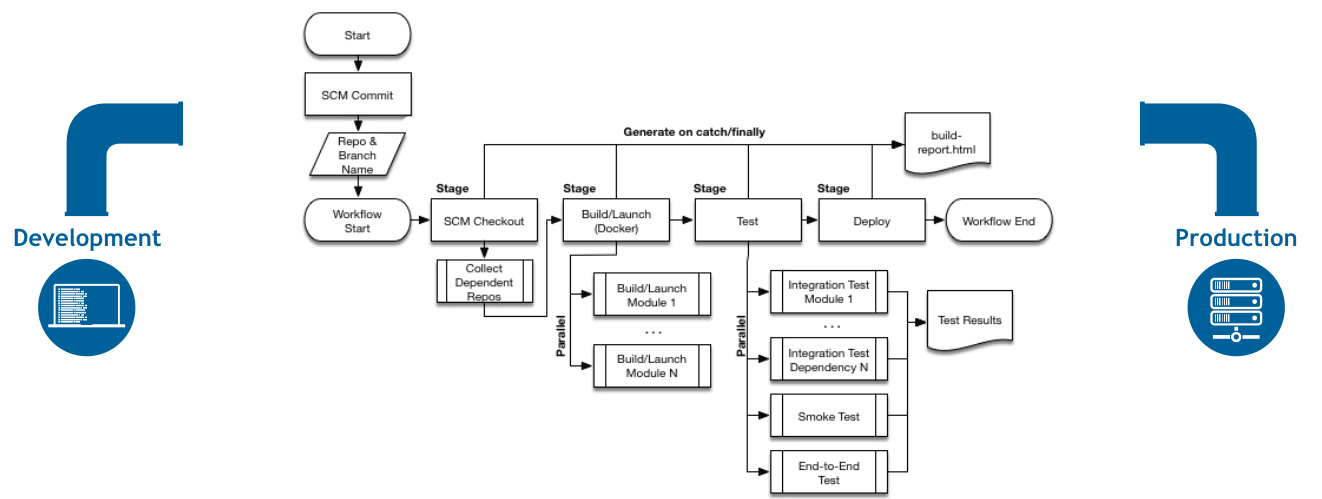
The flowchart below is an example of one CD scenario easily modeled in Jenkins Pipeline:
Pipeline concepts
The following concepts are key aspects of Jenkins Pipeline, which tie in closely to Pipeline syntax (refer to the overview below).
Pipeline
A Pipeline is a user-defined model of a CD pipeline. A Pipeline’s code defines your entire build process, which typically includes stages for building an application, testing it and then delivering it.
Also, a pipeline block is a
key part of Declarative Pipeline syntax.
Node
A node is a machine which is part of the Jenkins environment and is capable of executing a Pipeline.
Also, a node block is a
key part of Scripted Pipeline syntax.
Stage
A stage block defines a conceptually distinct subset of tasks performed
through the entire Pipeline (e.g. "Build", "Test" and "Deploy" stages),
which is used by many plugins to visualize or present Jenkins Pipeline
status/progress.
[6]
Step
A single task. Fundamentally, a step tells Jenkins what to do at a
particular point in time (or "step" in the process). For example, to execute
the shell command make, use the sh step: sh 'make'. When a plugin
extends the Pipeline DSL, [1] that typically means the plugin has
implemented a new step.
Pipeline syntax overview
The following Pipeline code skeletons illustrate the fundamental differences between Declarative Pipeline syntax and Scripted Pipeline syntax.
Be aware that both stages and steps (above) are common elements of both Declarative and Scripted Pipeline syntax.
Declarative Pipeline fundamentals
In Declarative Pipeline syntax, the pipeline block defines all the work done
throughout your entire Pipeline.
pipeline {
    agent any (1)
    stages {
        stage('Build') { (2)
            steps {
                // (3)
            }
        }
        stage('Test') { (4)
            steps {
                // (5)
            }
        }
        stage('Deploy') { (6)
            steps {
                // (7)
            }
        }
    }
}| 1 | Execute this Pipeline or any of its stages, on any available agent. |
| 2 | Defines the "Build" stage. |
| 3 | Perform some steps related to the "Build" stage. |
| 4 | Defines the "Test" stage. |
| 5 | Perform some steps related to the "Test" stage. |
| 6 | Defines the "Deploy" stage. |
| 7 | Perform some steps related to the "Deploy" stage. |
Scripted Pipeline fundamentals
In Scripted Pipeline syntax, one or more node blocks do the core work
throughout the entire Pipeline. Although this is not a mandatory requirement of
Scripted Pipeline syntax, confining your Pipeline’s work inside of a node
block does two things:
-
Schedules the steps contained within the block to run by adding an item to the Jenkins queue. As soon as an executor is free on a node, the steps will run.
-
Creates a workspace (a directory specific to that particular Pipeline) where work can be done on files checked out from source control.
Caution: Depending on your Jenkins configuration, some workspaces may not get automatically cleaned up after a period of inactivity. Refer to the tickets and discussion linked from JENKINS-2111 for more information.
node {  (1)
    stage('Build') { (2)
        // (3)
    }
    stage('Test') { (4)
        // (5)
    }
    stage('Deploy') { (6)
        // (7)
    }
}| 1 | Execute this Pipeline or any of its stages, on any available agent. |
| 2 | Defines the "Build" stage. stage blocks are optional in Scripted Pipeline
syntax. However, implementing stage blocks in a Scripted Pipeline provides
clearer visualization of each stage's subset of tasks/steps in the Jenkins UI. |
| 3 | Perform some steps related to the "Build" stage. |
| 4 | Defines the "Test" stage. |
| 5 | Perform some steps related to the "Test" stage. |
| 6 | Defines the "Deploy" stage. |
| 7 | Perform some steps related to the "Deploy" stage. |
Pipeline example
Here is an example of a Jenkinsfile using Declarative Pipeline syntax — its
Scripted syntax equivalent can be accessed by clicking the Toggle Scripted
Pipeline link below:
pipeline { (1)
    agent any (2)
    options {
        skipStagesAfterUnstable()
    }
    stages {
        stage('Build') { (3)
            steps { (4)
                sh 'make' (5)
            }
        }
        stage('Test'){
            steps {
                sh 'make check'
                junit 'reports/**/*.xml' (6)
            }
        }
        stage('Deploy') {
            steps {
                sh 'make publish' //
            }
        }
    }
}| 1 | pipeline is Declarative
Pipeline-specific syntax that defines a "block" containing all content and
instructions for executing the entire Pipeline. |
| 2 | agent is Declarative Pipeline-specific syntax that
instructs Jenkins to allocate an executor (on a node) and workspace for the
entire Pipeline. |
| 3 | stage is a syntax block that describes a
stage of this Pipeline. Read more about stage blocks in
Declarative Pipeline syntax on the Pipeline syntax page. As
mentioned above, stage blocks are
optional in Scripted Pipeline syntax. |
| 4 | steps is Declarative Pipeline-specific syntax that
describes the steps to be run in this stage. |
| 5 | sh is a Pipeline step (provided by the
Pipeline: Nodes and Processes plugin) that
executes the given shell command. |
| 6 | junit is another Pipeline step (provided by the
JUnit plugin) for aggregating test reports. |
Read more about Pipeline syntax on the Pipeline Syntax page.
Please submit your feedback about this page through this quick form.
Alternatively, if you don't wish to complete the quick form, you can simply indicate if you found this page helpful?
See existing feedback here.